
Friday Digital Roundup
The Friday Digital Roundup is a witty take on the weird world of the internet. With fun stories from around the globe, it’s the only email newsletter you’ll actually read and enjoy!
We do love writing it, but clearly not as much as people like receiving it - just look at the response we got when a technical hitch meant it wasn’t sent out on time!
@roisinduffyVA @roisinduffyva
@Spaghetti_Jo
Coffee and the FDR is how I start my Friday.
Do not engage until I have devoured both
Meschi Consultants @MeschiConsult
When it comes to the end of the week, there is no better way to start a Friday than with a run around the internet with Todd and Jo in the FDR. Just don't let them know I do it from the loo!
Kathryn Lynch-Smith @KikikatSmith
@Spaghetti_Jo
My inbox is full of rubbish newsletters that Im constantly deleting😬 My VIP inbox is for 1 thing only- THE DIGITAL ROUNDUP🤠I dont read a Newspaper or the news online, I just wait for Fridays, when this lands in my inbox- then I know ‘The weekend has landed’🤗
Get the Friday Digital Roundup and see what everyone’s talking about.
We may look like cowboys, but we’ll never abuse your data! Find out what we’ll do with it here, partner.
Spaghetti Blog
Tuesday 6th October 2026
Google Search Console: The Biggest Kept Secret in Your Business Marketing?
Google Search Console: The Biggest Kept Secret in Your Business Marketing?
One of the most underused free tools for a small business is Google Search Console.
We’ve lost count of the number of times we’ve spoken to new clients or leads and asked them for access to their Google Search Console, just to give us an insight into how people are finding their business, and they’ve never heard of it.
So we thought we’d lay this out here so we can share it to help you out.
What is Google Search Console?
Firstly, what even is Google Search Console? Well, Google Search Console is what I call the mother ship to Google Analytics. Most people have heard of Google Analytics. That’s where you can see how much traffic your website gets, your bounce rate, click rate, and lots of other cool things including pie graphs and shit people don’t understand. But Google Search Console is the first stage to it all, and if you’ve ever heard of getting your website indexed on Google, then this was often the tool people would refer to.
Google Search Console is a fantastic resource and a great tool for learning about your business, and here are 10 things (plus a bonus one at the end) that will hopefully encourage you to use Google Search Console for your business, or at least look into it a little bit further.
-
See the exact keywords people type into Google
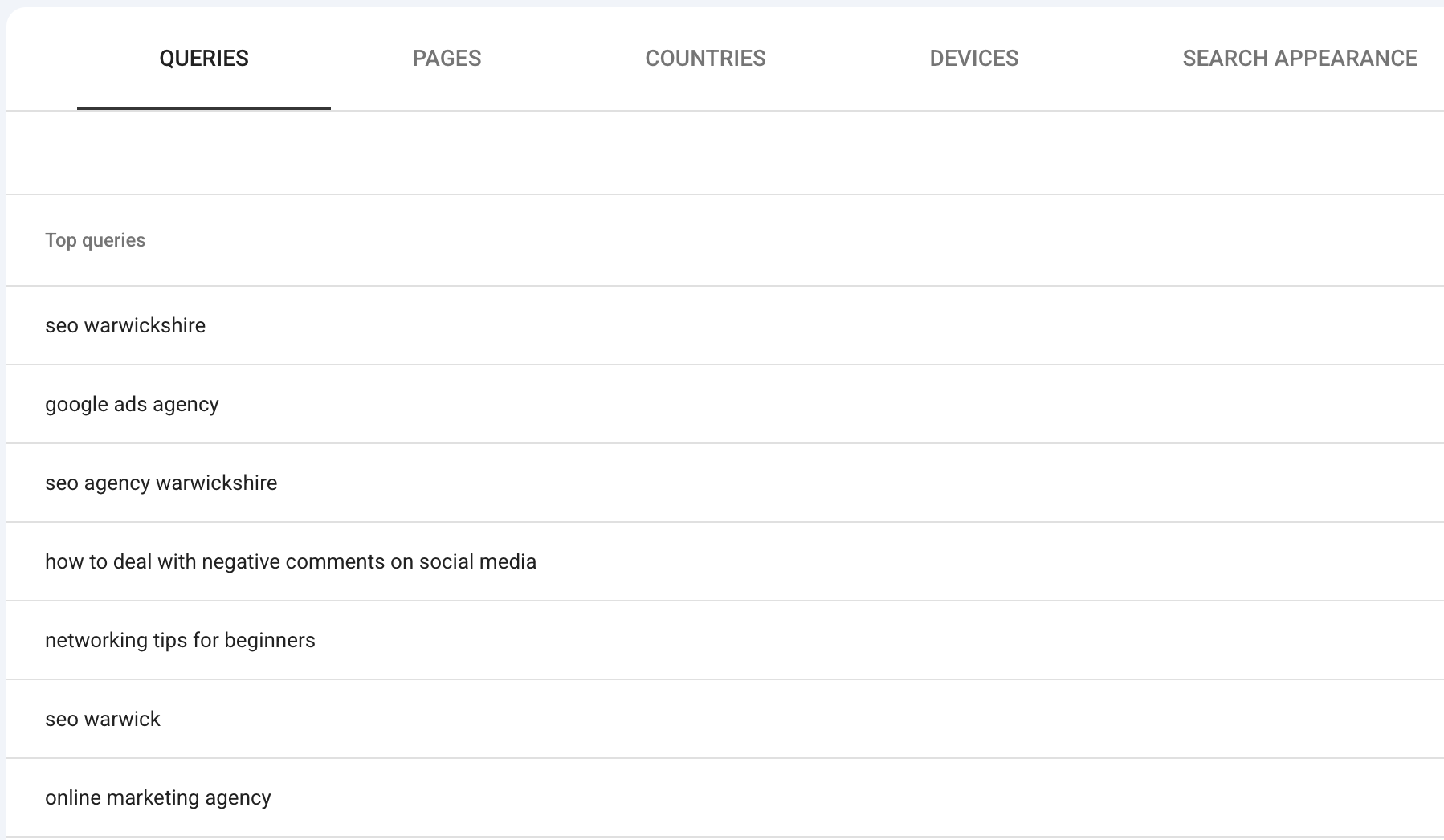
The first one, and probably the most exciting one, is you get to see the exact keywords that people type into Google to find your business. That’s right, you actually get to see what words people type into Google who then eventually find your website.
It’s worth mentioning that these aren’t the only keywords you should focus on, as these are only the keywords your website is ranked for. For example, if you’ve written the copy and optimised the website yourself with no real thought into SEO, there may well be other terms that you should appear for. But this is useful detail: these keywords are actually the words people type into Google to find you.
-
See where you rank for those search terms
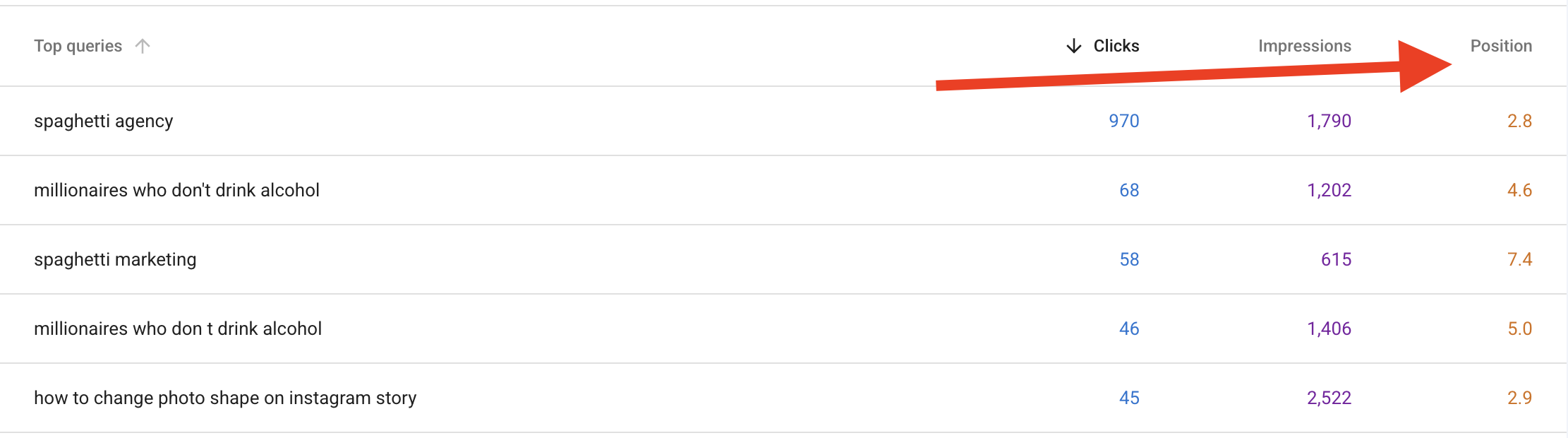
And the second one leads on from that. Google Search Console will also show you where you rank on Google for that particular term or search term. By simply clicking the search position at the top of Google Search Console, you can easily see where you rank on Google for particular search terms, and you can see, over the period of 16 months (which is the maximum you can set it to), how your improvement, or not improvement, over the last 16 months is going. So you can see if you’ve optimised pages and content, and whether that’s working for you or not.
-
Find your low-hanging fruit
The third one, also in the same screen: you can see your low-hanging fruit. You can find pages which have high impressions but low clicks. What this means is that your website pages are appearing a lot of times on Google but getting very few clicks. This is usually because they’re not ranked high enough on Google (see the point above). This gives you a nice shopping list of pages to go and look at and see what you can do to improve. Is the content thin? Does it have terrible titles? Have you optimised it at all? Is it ranking for a keyword that’s completely irrelevant or by mistake? Often this use of Google Search Console, where you look for high impressions and low clicks, gives you some really good work to go and improve your website.

-
Check which pages are indexed
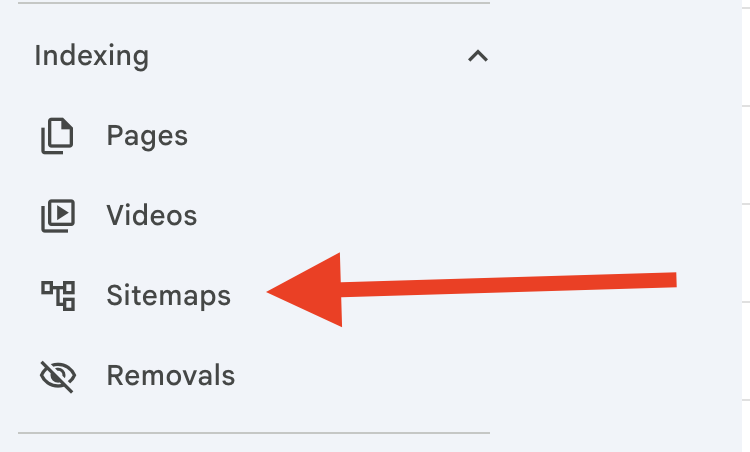
As I mentioned earlier, you can also ensure that pages are indexed on Google. You can see your sitemap in Google and see how many pages Google’s indexed. This is actually a really good screen, because then you can see which pages are indexed and which pages are not indexed. Often, when I speak to clients, they see that important pages have been no-indexed by accident, and non-important pages are indexed. For example, if they’ve got loads and loads and loads of blog pages (not blog posts, but blog pages) indexed, then that’s often thin and pointless content. Some people have author pages that are indexed, other people have images that are indexed that don’t need to be indexed. So looking at your Search Console sitemap and seeing what’s indexed and what isn’t is a really good use of your time and can improve your SEO overall.
-
Fix usability issues
You can also fix usability issues. You can see if your website’s hard to read on mobile phones, for example, so you can track what’s working and what isn’t. You can also get alerts from Search Console if you want to. Keeping an eye on the usability of your website is obviously incredibly important.
-
Check your Core Web Vitals
You can also do things like check Core Web Vitals, which looks at load speeds to make sure that your website isn’t too slow and isn’t harming your results in the search engines. This is becoming even more important now that most of us are using AI to search, because AI is incredibly fast, and although it does pre-index websites into its database ahead of time, there are times when AI will go out and search for websites. Clearly, having a faster website is going to give you more chance of being used as a citation than if you were super slow. So keeping an eye on your Core Web Vitals is a useful way to do it, and Search Console allows you to do that really, really simply.
-
Keep an eye on your backlinks
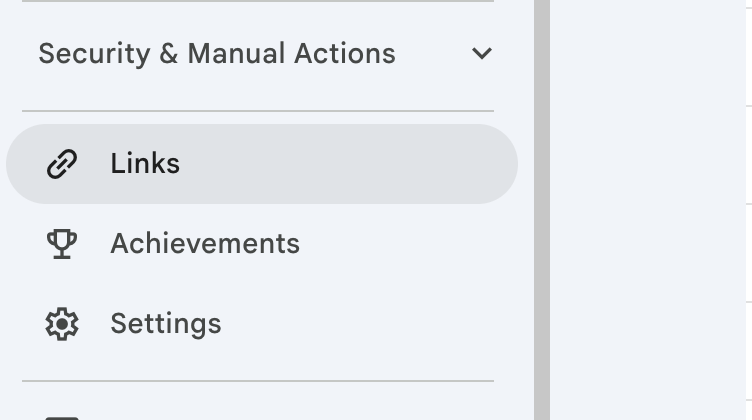
You can also look at your backlinks. Backlinks are a hugely important part of your search engine optimisation (SEO), and you can see the links to your site, and also the sites you link out to, in your Search Console. Keeping an eye on these is important, especially if you have toxic backlinks, or backlinks sent to your website that are not serving you. For example, we have seen this before with malicious behaviour, where competitors have sent really dodgy links towards our clients’ accounts. Google Search Console has told us this, and we’ve removed them using the disavow tool, which is a specialist tool within Google Search Console.
-
Submit your sitemap
You can also submit your sitemap. As I said earlier, the sitemap is in here, but you can also submit the sitemap in Google Search Console, which allows Google to quickly crawl new products, services, or blog content. Having your sitemap directly added into Google Search Console just makes the job of indexing your website easier.
Many years ago, we met with a client (a lead at the time) and they realised that they were no longer on Google. They weren’t finding their pages on Google, and people had said ‘we couldn’t find you on Google’. A simple search in their Google Search Console found that a website update had changed the site index, and therefore it was no longer updating. In Google Search Console was the old sitemap URL. Our quick change made all the difference, and within a few weeks they realised they were back on Google. And they’ve been a client of ours ever since. Funny, that.
-
Catch security and penalty warnings early
You can also catch security and penalty warnings early. Some people say, ‘I don’t know if I’m in trouble with Google’. Well, Google Search Console is the place to go. You’ll see any security or penalty warnings on your site in Google Search Console. You’ll also check for things like hacking and malware, or, of course, if you’ve been penalised by Google.
-
See your click-through rates
And then finally, see the click-through rates. You can see what percentage of searchers actually click on your listings and then click through to your pages. This can help you improve copy, metadata, meta titles, and descriptions to encourage people to come through from the search results on Google. The click-through rate is a percentage measurement of the amount of people that see your results on Google and then go on to click through to your website. So clearly, increasing this number improves what’s shown on Google in the search results, and you will only really see this via Search Console and other SEO tools.
The bonus tip: index your social media
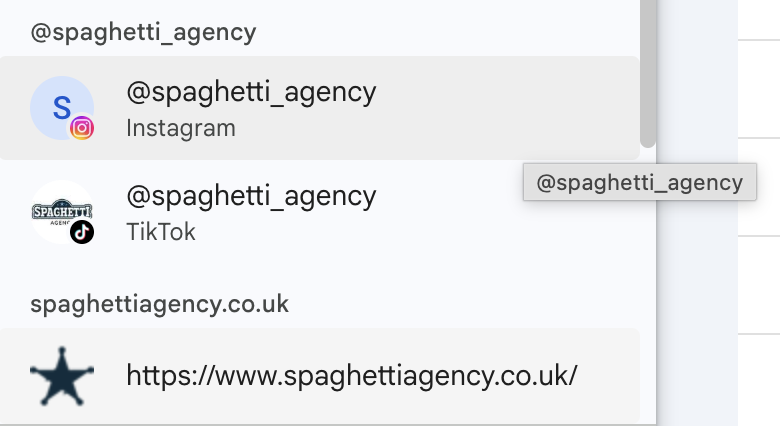
And the bonus one I promised at the beginning: you can index your social media. At the time of creating this, you can add TikTok and Instagram into your Search Console. You can also add X and YouTube, and I highly recommend that you do. With the popularity of AI, and the more intelligent indexing and insights with websites, it’s become apparent that social media has stepped up in its level of importance in terms of citations. What I mean by this is that tools like ChatGPT will now search what’s said about you on social media, and what you say on social media. We’re not really sure at this early stage what the reason for Google adding this into Search Console is, but I suspect it’s a really good thing to do to allow Google to actually see your social media in its index, which will naturally impact on the way people find you online. I highly suspect this will also help how you’re found on AI, but that’s an assumption at this point.
Hot off the press: see your generative AI impressions
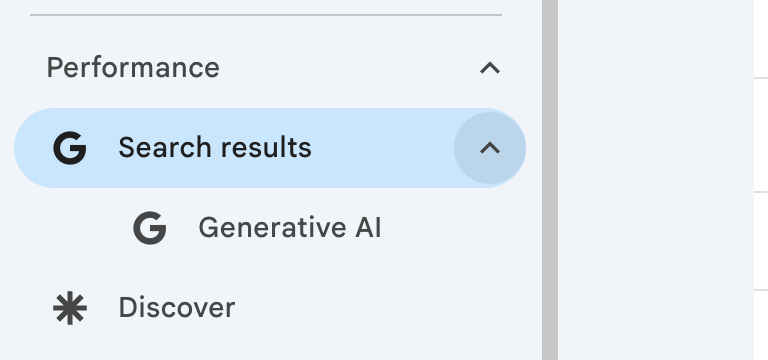
And one more thing before I go, because this one’s brand new. Google Search Console now shows you your impressions in Google’s generative AI features. In June 2026, Google launched a dedicated generative AI performance report, so you can now see how often your pages appear in AI Overviews (that’s the AI answer that sits at the top of Google’s search results) and AI Mode. You can break it down by page, country, device, and date.
A couple of things worth knowing. It’s impressions only at this stage, so no clicks or click-through rates yet. It’s rolling out gradually to all users, so don’t panic if you can’t see it in your Search Console just yet. You’ll find it in the drop down next to search results.
And it isn’t new data. Those impressions were always counted in your overall totals. What’s new is you can finally see them separately… which is really useful!
Given everything I said above about AI search, this is a big deal. For the first time, you can actually see how visible your business is in Google’s AI answers.
So, there you go. That’s Google Search Console: the biggest kept secret in the world of web development.
If you want to know how well your website’s performing, or you want to find yourself a list of pages to improve, or you’re just curious as to how well you rank on Google, then Google Search Console is definitely the tool for you.
TL;DR
Google Search Console is a free tool from Google, and it’s one of the most underused resources for small businesses. It shows you the exact keywords people type into Google to find you, where you rank for them, and which pages get lots of impressions but few clicks. You can check what’s indexed, submit your sitemap, fix usability issues, monitor Core Web Vitals and backlinks, and catch security or penalty warnings early. The bonus tip: you can now add TikTok, Instagram, X, and YouTube to Search Console, which matters more than ever with AI search on the rise. And hot off the press: Search Console now has a dedicated generative AI performance report, showing how often your pages appear in AI Overviews and AI Mode.
If you need help with your SEO (search engine optimisation) or content, then feel free to give us a shout. Maybe we could help you find the biggest gap in your business.
Do You Struggle to Create Content to Generate Sales?
We’ve Created a FREE Online Marketing Plan…
Use our simple ideas generator to help you make better content, over and over again…

Tags associated with this article
Post a comment
We'd love to know what you think - please leave a comment!
99 Simple Marketing Tips
99 Simple Marketing Tips You Can Use to Treble Your Business
Struggling to know where to start with your digital marketing?
We’ve got a tonne of ideas that you can put in place for your marketing – directly from our past 8 years growing an engaged following and strong business.

What You’ll Get
- #ToddsTips
- 4Networking
- AI
- Blogging
- Brand
- Business
- Case study
- Content
- Content Marketing
- Copywriting
- Digtial Marketing Trends
- Email marketing
- Facebook Ads
- Facebook Groups
- Facebook Live
- Google Adwords
- Hashtags
- How to
- Marketing
- Marketing strategy
- Networking
- Outsourcing
- PPC
- PR
- Press Releases
- Proofreading
- SEO
- Social
- Social Media
- Spaghetti Agency
- Storytelling
- Technology
- Video
- Video marketing
- Vision
- Websites
- Workshops
- YouTube




0 comments on this article